
An IPTV Reseller Panel Dashboard is the screen where a reseller loads credits, opens or renews customer lines, and tracks account activity without touching the underlying server. It replaces a mix of spreadsheets, chat logs and guesswork with one login that shows exactly what’s happening across every line you’ve sold. For anyone running or starting an IPTV reseller business, this dashboard is the actual workplace, not the marketing page around it.
What Actually Sits Inside a Reseller Dashboard
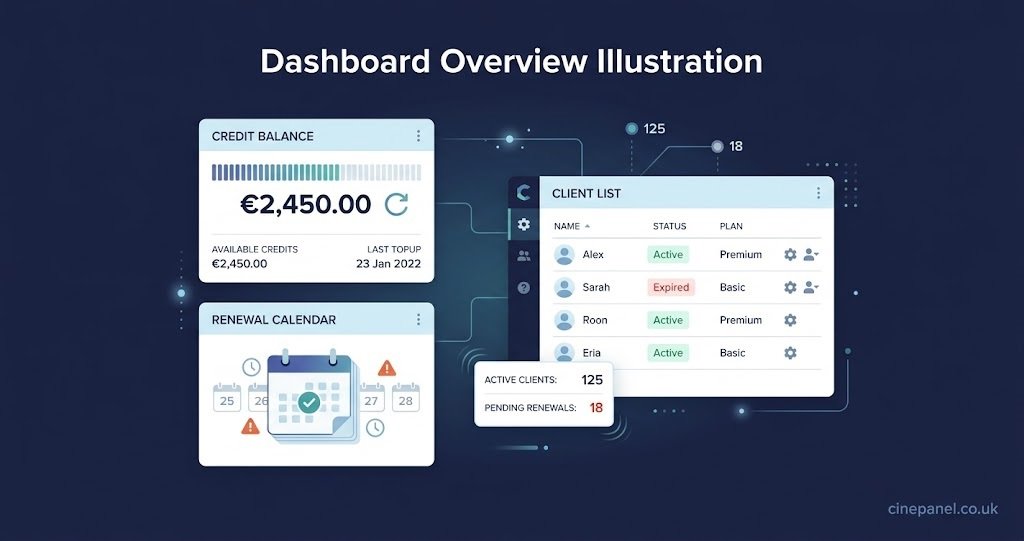
Strip away the branding and most dashboards are built from the same handful of working parts. There’s a credit balance, a client or line list, a way to create and renew subscriptions, some form of activity or connection log, and usually a section for managing sub resellers underneath the main account.
None of this is decorative. The credit balance tells you how much stock you have left before you need to top up. The client list is where you search a customer by name or device when something goes wrong at 9pm on a Friday. The activity log is often the only place that shows whether a connection is actually stable or quietly dropping. If any of these four are missing, awkward to find, or buried three menus deep, the dashboard is going to slow down exactly the moments where speed matters most.
Some panels add extras such as bulk line creation, branded customer portals, or usage reports broken down by device type. These are genuinely useful once you’re managing more than a handful of clients, but they’re not what makes a dashboard functional. A reseller with fifteen lines needs the four basics working properly far more than they need a reporting suite they’ll open once a month.
Evaluating an IPTV Reseller Panel Dashboard Before You Commit
This is where most resellers make their decision too quickly, usually based on price per credit alone. Price matters, but a cheap panel with a dashboard that hides your renewal dates will cost more in lost customers than it saves in credits.
Before trusting a panel with real customer money, check how it behaves under normal daily use rather than just how it looks in a screenshot.
| Decision factor | What to check |
|---|---|
| Credit expiry | Whether unused credits sit on the account or vanish after a fixed window |
| Renewal visibility | Whether upcoming renewals are flagged automatically or need manual tracking |
| Sub reseller controls | Whether you can limit what a sub reseller sees and spends |
| Support access | Whether panel issues get a real response outside office hours |
Pro tip: Open a trial line yourself during a busy evening slot before you sell to a single customer. A dashboard that looks fine at 2pm can behave very differently once demand peaks.
A panel that scores well here tends to be one where the people running it treat the dashboard as a working tool for operators, not a sales interface for prospective resellers. Cine Panel’s credit-based reseller structure is one example of pricing designed so unused credits stay on the account rather than expiring mid-month, which removes one common source of dashboard confusion.
Reading the Numbers Like an Operator, Not a Spectator
Once a panel is live, the dashboard stops being something you evaluate and starts being something you read daily. Three numbers matter more than the rest: remaining credits, active connections, and renewals due in the next seven days.
Credit burn is the easiest to ignore until it isn’t. A IPTV reseller Panel who checks the balance only when it’s empty is already a day behind on ordering more stock. Checking it two or three times a week, even briefly, avoids the scramble of trying to renew a client’s line while waiting on a credit top-up to clear.
Active connections tell a different story. A sudden drop in concurrent connections across several clients on the same evening usually points to something upstream rather than individual customer error. Spotting that pattern in the dashboard before three separate customers message you about buffering saves both time and reputation.
Renewal timing is the one most new resellers underestimate. A client who lapses because nobody flagged the renewal date doesn’t always come back, even if the service itself was fine. Most dashboards will surface this if you look, but very few surface it loudly enough to catch someone who isn’t checking daily.
Where New Resellers Get the Dashboard Wrong
The most common mistake isn’t technical. It’s treating the dashboard as something to check when there’s a problem, rather than a running record of the business. Lines get created without being logged against a customer name, trials expire without follow-up, and by month three nobody can say with confidence which client is on which plan.
The second mistake is granting sub reseller access without setting proper credit limits. A sub reseller with unrestricted spending can burn through a shared balance faster than expected, and untangling who spent what after the fact is far harder than setting the limit correctly at the start.
The third is ignoring the activity log until a customer complains. Most dashboards log disconnections and failed authentications in real time. Reading that log occasionally, even without a specific complaint to chase, often reveals a struggling connection before the customer notices it themselves.
Sub Reseller Permissions Inside the Dashboard
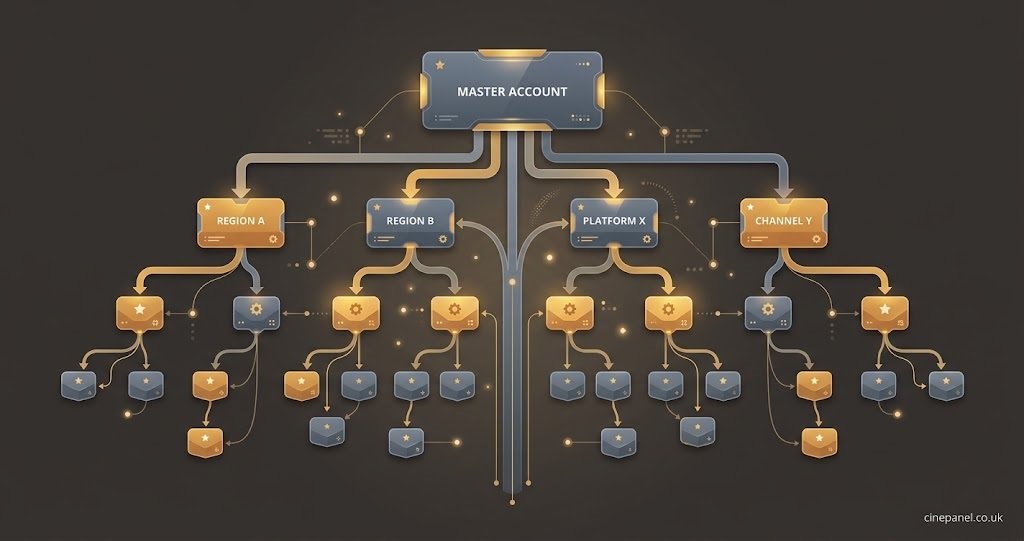
Running sub resellers changes what the dashboard needs to do. Instead of managing individual customer lines, the master account is managing other accounts that manage lines, which means visibility becomes the priority over raw feature count.
A properly built dashboard lets a master account see the wider IPTV reseller tree without losing the ability to cap what each sub reseller can spend or see. Without that separation, a single sub reseller mistake, whether it’s overselling trials or mishandling a customer, becomes very difficult to trace back to its source.
Pro tip: Review sub reseller credit limits monthly rather than setting them once and forgetting them. Demand changes, and a limit that made sense at launch can quietly become too tight or too loose within a few months.
Common IPTV Reseller Panel Dashboard Questions
What’s the difference between a dashboard and the panel itself?
The panel is the whole system, including the backend infrastructure delivering the service. The dashboard is the front-end screen a reseller actually logs into to manage credits, lines and clients.
Can I see everything a sub reseller does from the master dashboard?
Most properly built systems allow this, though the level of detail varies. Check this specifically before offering sub reseller access, since some panels only show summary totals rather than individual line activity.
Do dashboard credits usually expire?
This varies by provider. Some panels expire unused credits after a fixed period, while others leave the balance untouched until it’s spent. This is worth confirming before buying in bulk.
Why does my dashboard show different numbers to what my customer experiences?
Dashboards typically log connection and authentication events on a short delay, so a customer’s live buffering issue may not appear as a logged event for a few minutes. Persistent mismatches usually point to a routing or device issue rather than a dashboard fault.
Is a mobile-friendly dashboard actually necessary?
For resellers who manage lines from a phone during evenings, yes. Checking renewals or resetting a stuck connection shouldn’t require sitting at a laptop.
Conclusion
An IPTV reseller panel dashboard is only as useful as the habits built around it. The screen itself won’t stop a renewal being missed or a sub reseller overspending, but a reseller who reads the credit balance, activity log and renewal list regularly will catch most problems before a customer does. Before committing to any provider, test the dashboard under real evening load, confirm how credits and sub reseller permissions actually behave, and treat daily checks as part of running the business rather than an occasional chore.
Reseller Dashboard Checklist
- Confirm whether unused credits expire or carry over
- Test the dashboard during a busy evening period, not just during setup
- Set sub reseller spending limits before granting access
- Check the activity log for disconnection patterns weekly
- Log every new line against a customer name and start date
- Review renewal dates at least twice a week
[…] most common error isn’t technical, it’s arithmetic. New UK IPTV Panel resellers often price a monthly line without first working out the wholesale cost per credit against their […]