An IPTV Reseller Expiry Reminder does two jobs at once. It warns you that a customer line is about to run out, and it warns the customer before their picture goes dark. Most IPTV Panel resellers set up the first half and assume the second half happens by itself, which is exactly where renewals get lost.
The thing worth checking first is not which tool you use, but how many days of warning you actually give. A reminder that arrives on the morning of expiry converts far worse than one sent while the customer is still watching happily, because nobody enjoys paying under pressure. Decide your timing, then pick the method that fits your customer list.
The two halves of a reminder, and why one usually gets ignored
The panel-side half is a data problem. You need to know, on any given morning, which lines expire in the next fortnight and which ones expired yesterday without a payment landing.
The customer-side half is a communication problem, and it is the one that pays. A household that has not been told anything simply notices the stream stopped, assumes something broke, messages you annoyed, and only then discovers they owe money. That conversation starts from a bad place. The same customer, told five days earlier that their month ends on Friday, usually just pays.
Treat these as separate workflows even if one tool touches both. Your reporting can be automatic. Your messaging can be partly automatic, but the tone of it is still your business.
What the reseller dashboard tells you, and what it leaves to you
Almost every IPTV reseller panel stores an expiry date against each line and lets you sort or filter by it. That is the raw material. What varies enormously between panels is how much is done for you on top of it.
Some panels include built-in renewal notices and let you push a message or an email when a line approaches its end date. Others give you nothing beyond a sortable list and expect you to export it. Before building any routine around a feature, open your own dashboard and confirm which of these you actually have, because assuming a reminder was sent when it was not is worse than sending nothing at all.
Three things are worth checking in your panel specifically:
- Whether expiry dates are shown in your local time or the server’s time
- Whether a line stops instantly at expiry or carries a short grace period
- Whether you can export the customer list, even as a basic file, so you have a copy that does not depend on the supplier
Pro tip: Run a one-line test on yourself with a short duration and watch what happens at the end of it. Whatever the documentation claims, that test tells you exactly what your customers will experience.
Building an IPTV Reseller Expiry Reminder schedule that suits how people renew
There is no universal timing, but there is a pattern that works across most English speaking markets, where people are paid weekly or monthly and tend to deal with small bills in batches.
A workable three-touch sequence
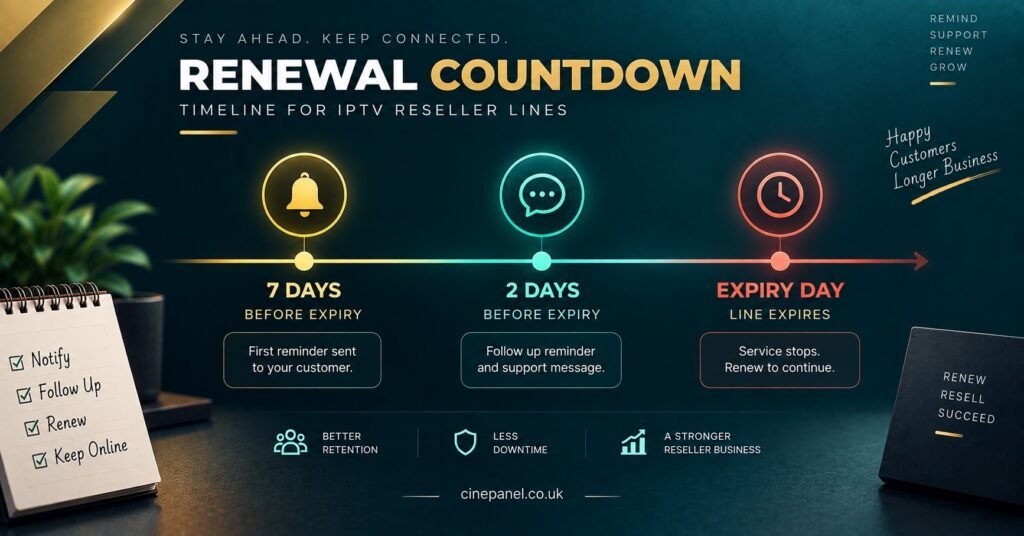
Seven days before expiry. The first notice. Friendly, no pressure, states the exact end date and the amount. This is the one most renewals come from, because the customer is still enjoying the service and the decision feels easy.
Two days before expiry. A short nudge for the people who meant to pay and forgot. Keep it to one or two lines.
On the day it ends, or the morning after. Not a warning any more, a service note. Confirm the line has stopped, confirm it can be reactivated the same day, and leave it there.
Anything more than three messages starts to feel like debt collection for a small monthly amount, and it costs you goodwill with people who might have come back next month anyway.
Adjust for plan length
Yearly and six-month customers need a longer runway, because a larger sum needs planning. Two weeks of notice is more sensible there, and a second reminder a week later. Weekly or trial lines need the opposite: one reminder, sent early on the final day, or none at all.
Writing the message so it reads like a service note
The wording matters more than most IPTV resellers expect. A reminder that sounds like an invoice gets ignored; one that sounds like part of the service gets paid.
Keep it short, put the date and the amount in plain sight, and make the next step a single action. Something along these lines works for the first touch:
“Hi Sam, quick note that your subscription runs until Friday 12th. Renewal is the usual amount and I can extend it as soon as you’re ready. Nothing to do if you’d rather leave it.”
And for the final touch:
“Hi Sam, your line ended this morning. Send the payment over whenever suits and I’ll switch it straight back on, usually within a few minutes.”
Two details do a lot of work there. Naming the day removes any ambiguity about what “expires this week” means, and mentioning how quickly you can reactivate removes the fear that lapsing means losing the account or the settings on their device.
Avoid automated-sounding blocks of text with reference numbers and formal sign-offs. Small operators win on being reachable and human; a reminder that reads like it came from a billing system throws that advantage away.
Where reminder systems quietly fail
Most reminder problems are not technical. They are small gaps between what you think is happening and what is actually happening.
| What goes wrong | Why it happens | What to change |
|---|---|---|
| Reminder sent to a dead contact | Customer changed number or moved app | Confirm the contact route at signup and again at first renewal |
| Line expires days earlier than expected | Panel date read in a different time zone | Note the server time once and work from a single reference |
| Customer pays but line stays off | Payment lands outside your working hours | Set an expectation in the message about reactivation times |
| Reminder goes out, no reply, no follow-up | No record of who was contacted and when | Keep a simple log with a status column, not just dates |
| Renewal fails at the last moment | No credits left on the account | Watch the balance alongside the expiry list |
That last row is common enough to deserve its own section.
Credit balance belongs in the same routine as the expiry list
A reminder only helps if you can act on the reply. If four customers renew on the same evening and your IPTV credits ran out that afternoon, the reminder has turned into a broken promise.
Look at the two numbers together. If you know that eleven lines expire in the coming week, you know the minimum credit spend that week, before any new customers. Topping up in advance costs nothing except the money sitting on the account, and most panels leave unused credits where they are until you spend them. Running a balance down to zero and buying in a panic mid-renewal is how good weeks turn into refund conversations.
For anyone comparing suppliers on this point, it is worth reading the terms carefully. A panel that expires unused credits changes the maths entirely, because stock you never used still cost you. The Cine Panel IPTV reseller panel is one of the setups built around non-expiring credits and a live balance on the dashboard, which is the arrangement that makes forward buying safe.
Pro tip: Once a week, pull the count of lines expiring in the next fourteen days and compare it against your remaining credits. Thirty seconds of arithmetic prevents most renewal-day scrambles.

When a customer goes quiet after the reminder
Silence is not always a lost customer. People go on holiday, change jobs, or decide to take a month off without telling anybody. How you handle that period shapes whether they come back.
A short grace window, a few days at most, costs you a small amount of credit and buys a lot of tolerance. Beyond that, let the line lapse rather than carrying it indefinitely. Extending free access for weeks teaches people that the expiry date is negotiable, and that habit spreads through a customer base surprisingly quickly.
Keep the lapsed contacts on a separate list rather than deleting them. A single message a few weeks later, with no pressure in it, recovers a reasonable share of them. What does not work is repeated chasing; a customer who has ignored four messages will not be persuaded by a fifth.
Records, time zones and selling across more than one country
If your customers sit in several English speaking countries, expiry dates become a small logistics problem. A line ending at midnight server time ends at a different hour in each market, and a reminder sent at nine in the morning your time may land in the middle of someone’s night.
You do not need complicated tooling for this. A column in your record showing the customer’s rough time zone, and sending in batches that respect it, is enough. What genuinely helps is writing dates out fully in messages. Numeric formats are read differently on either side of the Atlantic, and “renews on 3rd October” removes any chance of confusion that “03/10” creates.
Your record of each customer should hold, at minimum: name, contact route, device type, start date, expiry date, plan length, price paid, and the date of the last reminder sent. That is a short list, it fits in any spreadsheet, and it is the difference between an IPTV reseller business you can hand to someone else and a pile of chat threads only you can decipher.
Common Questions About Expiry Reminders
How many days before expiry should the first reminder go out?
Around seven days for monthly plans. Long enough that the customer is not being rushed, close enough that they do not forget. Longer plans justify two weeks.
Should reminders be automated or sent by hand?
Automate the detection, keep some judgement in the sending. Knowing which lines expire is pure data work and should never be manual. The message itself benefits from a human eye, especially for customers you have had support conversations with recently.
What happens if a customer pays after the line has already expired?
In most panel setups the line can be extended again immediately and the customer keeps their existing login details. Confirm this in your own dashboard before promising it, because behaviour differs between panels and a wrong promise costs more than the credit.
Do I need to remind sub-resellers about their customers’ expiry dates?
No, and doing it undermines them. Sub-resellers own their customer relationships. What you should watch is their credit balance, since a sub-reseller who runs dry cannot renew anyone underneath them.
Is it worth offering a discount inside the reminder message?
Rarely for a first reminder. It trains customers to wait for the discount before paying. A longer-plan offer at renewal time is a better use of the same idea, because it buys you fewer reminders to send next year.
What should I do about customers who never respond to anything?
Let the line lapse after your grace window, keep the contact on a lapsed list, and try once more a few weeks later. Repeated chasing for a small monthly sum is not worth the time or the reputation.
The Practical Takeaway
A good IPTV Reseller Panel Expiry Reminder routine is unglamorous and takes a few minutes a week: know which lines end soon, tell those customers early in plain language, keep enough credits on hand to act on the replies, and log what you sent. None of it requires sophisticated software, and none of it works if you only look at the expiry list on the day something breaks.
The limitation worth acknowledging is that no reminder system saves a customer who has decided to leave, and chasing one too hard costs you the chance of them returning. Aim to remove friction for the people who intended to pay, and let the rest go cleanly. The next sensible step is to open your reseller dashboard, sort by expiry date, and see how many lines are already inside your reminder window today.
[…] often assume they compete on server quality. In practice, the upstream infrastructure behind most IPTV panel resellers in a given market is broadly comparable, and the customer cannot evaluate it anyway. What they can […]